Your client asks a simple question: “We spent $15,000 on marketing last month. What did we get back?”
You have Google Ads showing conversions, an SEO report showing traffic growth, and a CRM tracking sales opportunities. But connecting those numbers into a clear answer takes hours.
That’s the reporting problem many marketing agencies face.
Marketing agency reporting tools help you bring campaign data together, automate recurring reports, and show clients what’s happening across their marketing channels.
But not every tool solves the same problem. Some are designed for branded client dashboards. Others specialize in SEO reporting, while marketing attribution platforms help connect campaign performance with conversions, pipeline, and revenue.
In this guide, we’ll compare six marketing agency reporting tools, explain where each fits, and help you choose the right solution for your clients and reporting needs.
Website analytics tool for modern marketers & agencies
Key takeaways
- Marketing agency reporting tools simplify client reporting. They consolidate data from multiple platforms and reduce repetitive spreadsheet work.
- Different tools serve different needs. AgencyAnalytics, Whatagraph, and DashThis focus on client reporting, while Usermaven emphasizes marketing attribution and revenue measurement.
- A useful client report goes beyond clicks and traffic. It connects campaign performance with leads, customer acquisition costs, pipeline, and revenue where data is available.
- Integrations and client access matter. Look for reliable data connections, scheduled reports, customizable dashboards, appropriate permissions, and branding options.
- Choose based on your agency’s services. An SEO agency may prioritize rankings and technical performance, while a B2B growth agency may need CRM-connected attribution and revenue reporting.
What is a marketing agency reporting tool?
A marketing agency reporting tool helps agencies collect, analyze, and share campaign performance data with clients. Instead of manually pulling numbers from Google Ads, Meta Ads, SEO platforms, and CRMs, agencies can use these tools to create dashboards and automate reports.
Some tools focus on presenting campaign results, while others help agencies connect marketing activities with leads, conversions, and revenue.
Ultimately, these tools serve as both internal decision-support systems and external client communication engines, making them foundational to a high-performing, scalable agency.
Website analytics tool for modern marketers & agencies
6 best marketing agency reporting tools in 2027
Here are six reporting tools worth considering, depending on your agency’s services, client requirements, and reporting goals.
| Tool | Best for | Key strengths |
| Usermaven | Marketing attribution and revenue reporting | Multi-touch attribution, customer journeys, funnels, revenue analysis, AI-assisted insights |
| AgencyAnalytics | Full-service digital marketing agencies | Cross-channel dashboards, automated reports, white-label reporting |
| Whatagraph | Multi-channel marketing reporting | Visual dashboards, data integration, customizable reports |
| DashThis | Simple, recurring client reports | Ready-made templates, automated reporting, easy dashboard setup |
| ReportGarden | PPC agencies and client management | Campaign reporting, budget monitoring, agency workflows |
| Ahrefs | SEO and content marketing agencies | Keyword tracking, backlink analysis, competitor research, SEO reports |
Each tool approaches reporting differently. Let’s compare their capabilities, ideal use cases, and limitations to help you find the right fit.
1. Usermaven
Best for: B2B SaaS, performance marketing, and growth agencies that need to connect marketing activity with conversions, pipeline, and revenue.
Usermaven is an AI-powered marketing attribution platform that helps agencies understand which marketing channels and customer interactions contribute to business outcomes.
While traditional reporting tools focus heavily on presenting campaign metrics, Usermaven helps agencies investigate what happens between the first marketing interaction and the final conversion.
This makes it particularly useful when clients ask questions such as:
- Which campaigns are contributing to qualified leads and revenue?
- How do customers interact with different channels before converting?
- Where are prospects dropping off?
- Which marketing investments deserve closer attention?
- How do acquisition costs compare with customer value?
Key features
Multi-touch attribution
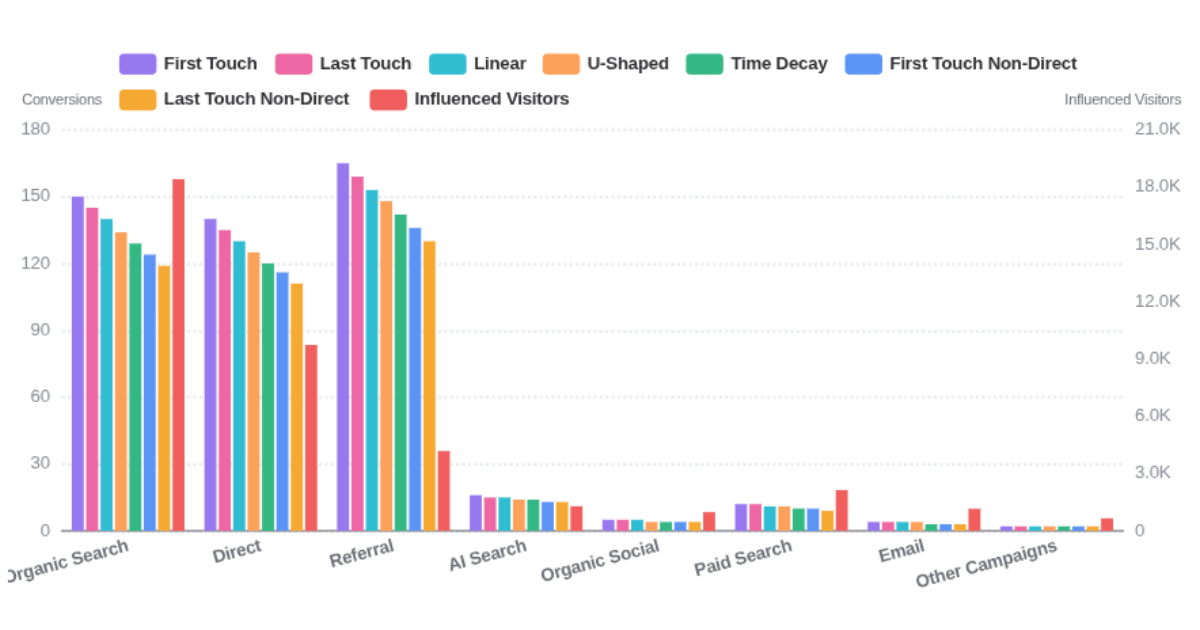
Usermaven supports multiple attribution models, allowing agencies to compare how credit is assigned to different marketing touchpoints.
Instead of relying only on the last recorded interaction, teams can examine how earlier and later interactions contribute to conversions.
Its multi-touch attribution software capabilities are especially relevant for agencies managing longer B2B buying journeys.
Customer journeys and funnel analysis
Agencies can examine recorded customer journeys and identify conversion gaps.
For example, a client may generate plenty of pricing page visits but relatively few demo requests.
Using funnel analytics, the agency can identify where visitors drop off and investigate differences between channels or audience segments.
Marketing spend and revenue analysis
Usermaven connects marketing performance with conversion and revenue data to support reporting on metrics such as ROAS, CAC, and attributed revenue.
For agencies serving B2B clients, CRM integrations can help connect marketing activity with sales outcomes when the relevant data is available and correctly configured.
Customizable dashboards and reports
Agencies can organize relevant metrics into analytics dashboards and share performance views with stakeholders.
Usermaven also supports scheduled reports, including reporting on funnels, attribution, trends, and other analytics areas.
Maven AI
Maven AI allows teams to investigate analytics questions using natural language.
Agencies can use it to explore performance patterns and prepare more informed client discussions without manually navigating every report.
Separate client workspaces and white-label options
Usermaven supports separate workspaces for different client accounts.
White-label analytics is available as an optional add-on for agencies that want to present analytics under their own brand.

Pricing
Usermaven offers Business and Enterprise plans with custom pricing based on business requirements.
Optional services include onboarding and implementation, white-label analytics, and additional workspaces.
Agencies can discuss their reporting and attribution requirements through a demo.
What to consider
Usermaven is strongest when your agency needs marketing attribution, customer journey analysis, and revenue measurement.
If your primary requirement is a broad library of ready-made social media, SEO, and PPC report templates, a dedicated reporting platform may be a better fit.
Why agencies choose Usermaven: It helps connect campaign reporting with customer behavior and business outcomes, making it easier to move client conversations beyond clicks and traffic.
Book a demo to explore how Usermaven can support your agency’s reporting and attribution needs.
Website analytics tool for modern marketers & agencies
2. AgencyAnalytics
Best for: Full-service digital marketing agencies managing SEO, paid advertising, and other recurring client reports.
AgencyAnalytics is a client reporting platform designed for agencies that need to consolidate marketing performance data and deliver branded reports.
Its focus is reducing the time spent collecting data and preparing client-facing dashboards.
Key features
- Integrations with a broad range of advertising, SEO, and marketing platforms.
- Automated reports and reusable dashboard templates.
- White-label dashboards and client reporting.
- Client access and report-sharing options.
- Cross-client reporting capabilities for agency teams.
What makes it useful?
AgencyAnalytics is particularly relevant when an agency needs to report on several marketing services for the same client.
For example, an agency managing SEO, Google Ads, and social campaigns can bring those performance metrics into a shared reporting environment.
What to consider
AgencyAnalytics is primarily a marketing reporting platform.
Agencies that need detailed customer journey analysis, product analytics, or CRM-connected multi-touch revenue attribution should evaluate those requirements separately.
Best fit: Agencies that prioritize recurring, branded client reporting across multiple marketing channels.
3. Whatagraph
Best for: Agencies that need customizable visual reports and consolidated marketing data.
Whatagraph helps marketing teams connect data sources, build dashboards, and automate client reporting.
Its reporting and data-management capabilities are useful for agencies working with multiple campaigns, accounts, and marketing platforms.
Key features
- Cross-channel marketing data connections.
- Customizable reports and dashboards.
- Automated report delivery.
- White-label reporting options.
- Data transformation and reporting workflows.
What makes it useful?
Whatagraph is a good option for agencies that want to standardize reporting across multiple clients while maintaining flexibility in report presentation.
For example, a performance agency could build a common monthly report structure and adapt it for different clients.
What to consider
Review the available integrations, data transformation requirements, and pricing structure before committing.
More advanced reporting workflows may require additional setup and governance.
Best fit: Agencies managing complex cross-channel reporting requirements.
4. DashThis
Best for: Small and mid-sized agencies that want straightforward marketing dashboards.
DashThis focuses on helping agencies build and share marketing reports without a complicated setup.
It connects with common advertising, analytics, and SEO platforms and offers reporting templates designed for recurring client updates.
Key features
- Prebuilt marketing reporting templates.
- Connections to major marketing platforms.
- Automated dashboard updates.
- Scheduled report delivery.
- White-label reporting options.
- AI-assisted reporting insights.
What makes it useful?
DashThis is practical for agencies that want a simple way to combine marketing KPIs and deliver regular updates.
For example, a small PPC agency could use it to report on spend, clicks, conversions, and campaign performance without manually exporting data each month.
What to consider
Check whether its integrations and customization options cover your clients’ more specialized data requirements.
For agencies needing detailed customer-level journeys or advanced attribution, a separate analytics platform may still be useful.
Best fit: Agencies prioritizing ease of use and repeatable client dashboards.
5. ReportGarden
Best for: Agencies looking to combine campaign reporting with account management workflows.
ReportGarden is an agency reporting platform associated with PPC reporting, budgeting, and client management.
It aims to bring reporting and operational workflows into one environment. Agencies that prefer to manage client billing separately can use invoicing software to create invoices, track payment status, and organise recurring billing.
Key features
- Paid advertising and marketing performance reporting.
- Customizable client reports.
- Budget and campaign monitoring.
- Agency-oriented workflow features.
- Reporting templates and branding options.
What makes it useful?
ReportGarden may appeal to agencies that want reporting tools alongside budgeting or administrative workflows.
For example, a PPC agency managing several client budgets may benefit from keeping campaign performance and budget monitoring closely connected.
What to consider
Verify the availability of any invoicing, proposal, or billing functionality you specifically need before choosing a plan.
Agencies requiring deep product analytics or multi-touch revenue attribution should also check whether ReportGarden supports those workflows.
Best fit: PPC agencies looking for reporting alongside broader client-management processes.
6. Ahrefs
Best for: SEO and content marketing agencies that need search performance and competitor reporting.
Ahrefs is primarily an SEO and search intelligence platform, rather than a general-purpose marketing agency reporting solution.
However, its SEO reporting capabilities make it valuable for agencies focused on organic search, backlinks, technical SEO, and competitive research.
Key features
- Organic keyword and search visibility analysis.
- Backlink monitoring and competitor research.
- Technical website audits.
- Rank tracking.
- Custom SEO reports through Report Builder.
- Search and AI visibility reporting capabilities.
What makes it useful?
An SEO agency can use Ahrefs to show changes in keyword visibility, referring domains, competitor performance, and technical website health.
Its Report Builder allows teams to organize selected SEO metrics into reports for stakeholders.
What to consider
Ahrefs doesn’t replace a complete paid advertising, CRM, or revenue attribution reporting stack.
Also, estimated organic traffic and competitor metrics should be distinguished from a client’s actual first-party analytics data.
Best fit: Agencies where SEO reporting and competitive intelligence are core services.
How to choose the right marketing agency client reporting tool
The best client reporting platform is the one that matches your clients’ goals and your agency’s workflow.
Before choosing, evaluate these six areas.
1. Start with what your clients want to know
Some clients want campaign visibility. Others want to understand which marketing activities contribute to sales.
For example:
- A local SEO client may want rankings, organic leads, and calls.
- An ecommerce client may prioritize purchases, ROAS, and average order value.
- A B2B SaaS client may need qualified leads, opportunities, and attributed revenue.
Choose a tool that can answer those questions reliably.
2. Audit your current data sources
List the platforms you use for advertising, analytics, CRM, ecommerce, and SEO.
Check whether your shortlisted tools support the data you need, not just whether they advertise an integration.
For example, a CRM integration that imports contact counts may not provide the opportunity and revenue fields needed for pipeline attribution.
3. Decide how much reporting automation you need
Estimate how long your team currently spends preparing reports.
Then identify which tasks can be automated, such as updating dashboards, scheduling delivery, or applying consistent templates.
Keep analysis and recommendations as a separate responsibility.
4. Evaluate client access and branding
Determine whether clients need:
- Monthly PDF reports
- Live dashboards
- Scheduled email summaries
- Branded reporting portals
- Restricted access to specific data
Make sure each client can access the appropriate information without exposing another client’s account.
Look for a tool that lets you customize client-facing dashboards and reports. With white-label reporting, you can apply your logo, adjust branding, and deliver reports that reflect your agency’s identity.
5. Compare the total cost
Don’t compare tools only by their advertised starting price.
Check whether costs depend on:
- Number of client accounts or workspaces
- Number of dashboards
- Connected data sources
- Team members
- Usage volume
- White-label functionality
- Implementation or onboarding services
This matters as your agency adds clients and expands its reporting requirements.
6. Test a real client reporting workflow
Before committing, build a report for one existing client.
Try answering:
- Which campaigns performed best?
- What changed compared with the previous period?
- Which conversions or business outcomes were generated?
- Can you explain discrepancies between data sources?
- Can the client understand the report without a lengthy explanation?
A tool that looks impressive in a product demo may not fit your actual reporting process.
Why marketing agencies need reporting tools
Clients want to know how their marketing efforts are performing, whether it’s paid advertising, SEO, social media, or an email campaign. Agency reporting tools bring these results together, making it easier to understand which activities generate leads, conversions, and revenue.
- Save time: Automate data collection and recurring client reports.
- Improve transparency: Give clients a clear view of campaign performance.
- Track ROI: Connect marketing spend with conversions and revenue.
- Manage multiple clients: Keep dashboards and reporting data organized.
- Make better decisions: Identify trends, gaps, and opportunities faster.
- Simplify workflows: Combine reporting with automation strategies like agentic social media scheduling.
- Build client trust: Show measurable results and explain what’s working.
Common mistakes to avoid in agency reporting
Even good reporting software can’t fix unclear goals or poor measurement practices.
Watch out for these mistakes.
Reporting activity without business outcomes
Clicks, impressions, and traffic are useful context, but they don’t always indicate business growth.
Include conversion quality, pipeline, revenue, or other relevant outcomes when the data is available.
Combining incompatible metrics
Different platforms may use different attribution windows, conversion definitions, or reporting time zones.
Avoid adding their numbers together without checking whether they’re comparable.
Treating attribution as proof of causation
Attribution models assign credit according to defined rules or statistical methods.
They can help explain recorded marketing journeys, but they don’t automatically prove that a channel caused a sale.
Use attribution alongside experiments, platform data, and business results when making major budget decisions.
Overloading clients with dashboards
A report containing dozens of charts may make it harder to identify the important results.
Lead with the client’s goals, highlight meaningful changes, and explain recommended actions.
Automating reports without reviewing the data
Automation saves time, but disconnected integrations, missing events, or incorrect conversion settings can still produce misleading reports.
Regularly check data quality and marketing measurement assumptions.
Final thoughts
The best marketing agency client reporting tool depends on the questions your clients expect you to answer.
If your priority is delivering polished monthly reports across SEO, paid media, and social platforms, a dedicated reporting tool may be the right choice.
If clients want to understand how marketing contributes to qualified leads, customer acquisition, pipeline, and revenue, you need stronger attribution and analytics capabilities.
Usermaven helps agencies connect marketing interactions with customer journeys and business outcomes, so reporting can support better decisions about where to invest.
The goal isn’t simply to send reports faster. It’s to make every client report more useful.
FAQs
What is the best marketing agency reporting tool?
The best tool depends on your agency’s services and reporting needs. AgencyAnalytics, Whatagraph, and DashThis focus on automated client reporting. Ahrefs is particularly useful for SEO reporting, while Usermaven is relevant for agencies that need marketing attribution, customer journey analysis, and revenue reporting.
Can marketing agencies automate client reporting?
Yes. Many reporting platforms support scheduled reports, automated data updates, and reusable dashboards. However, agencies should still review data accuracy and provide context about performance changes.
What metrics should agencies include in client reports?
Include metrics that reflect the client’s goals. Common examples are ad spend, conversions, cost per lead, CAC, ROAS, qualified leads, pipeline, and revenue. SEO clients may also need search visibility, organic conversions, and technical performance metrics.
What’s the difference between agency reporting and marketing attribution?
Agency reporting organizes and presents marketing performance data. Marketing attribution analyzes how recorded marketing touchpoints contribute to conversions or revenue. Agencies can use both to explain campaign activity and evaluate business outcomes.
Do agencies need white-label reporting software?
Not always. White-label reporting is useful when an agency wants to deliver dashboards or reports under its own brand. However, data accuracy, relevant integrations, and useful performance insights should take priority over presentation alone.
How can agencies report marketing ROI more accurately?

Written by
Adeel Khan
Growth Marketing Expert
Adeel Khan is a full-stack SaaS marketer with 10+ years of experience in content marketing, paid advertising, analytics, and conversion rate optimization. He shares practical insights and strategies drawn from hands-on experience, helping B2B SaaS marketers improve performance and make better marketing decisions.
All articles by Adeel →