Have you ever wondered why the same campaign reports different conversion numbers across Google Ads, Meta, and your analytics platform?
In many cases, the difference comes down to one setting: the attribution window.
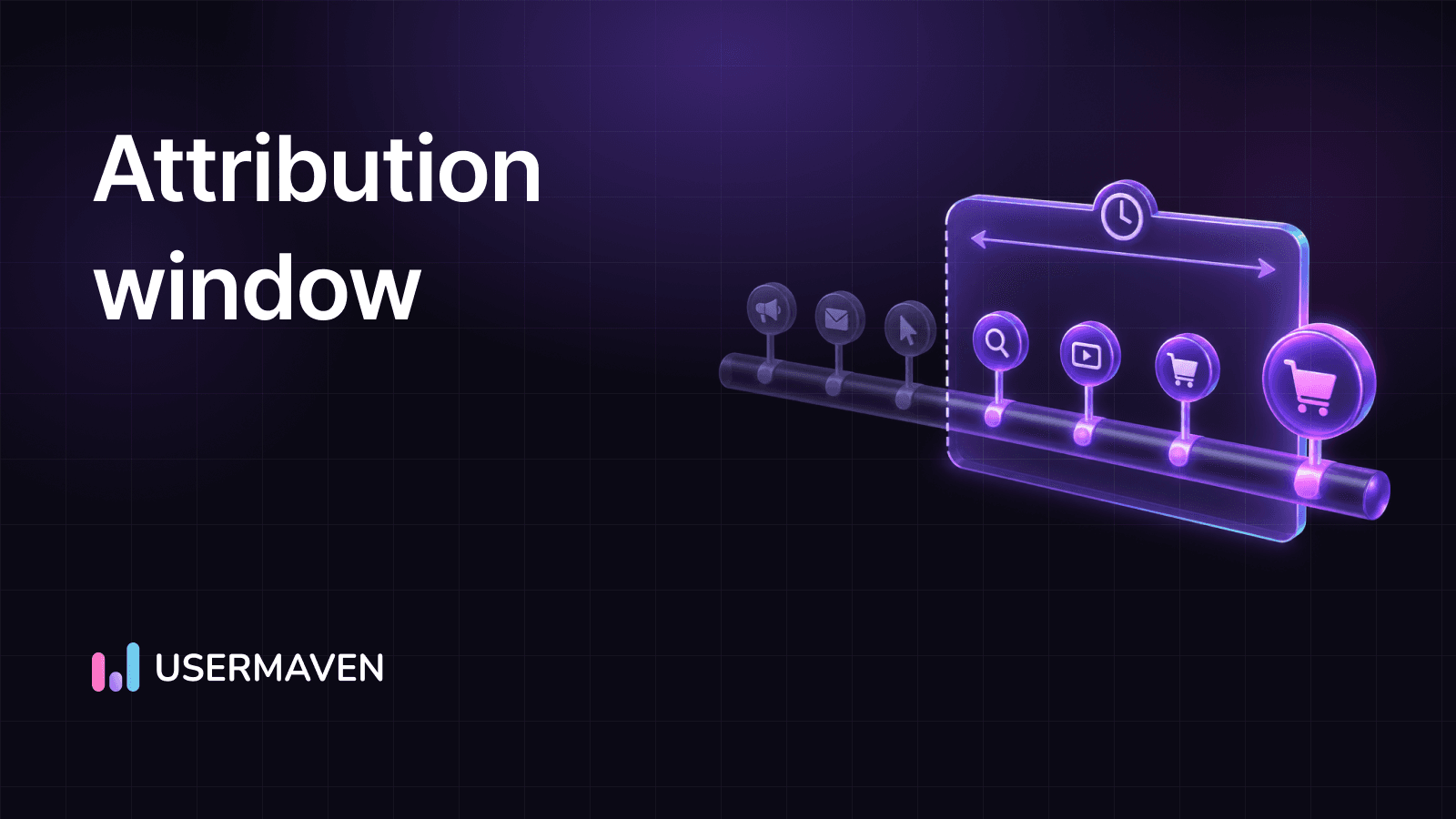
An attribution window defines how long after a user clicks, views, or interacts with your marketing a conversion can still be credited to that touchpoint. Choosing the right window helps you measure campaign performance more accurately, optimize marketing spend, and understand the full customer journey instead of only the final click.
Whether you’re running paid ads, email campaigns, or content marketing, the right attribution window ensures your marketing attribution reflects how customers actually buy. In this guide, you’ll learn how attribution windows work, how to choose the right one for your business, and how they influence metrics like ROAS, conversion attribution, and revenue reporting.
Key takeaways
- An attribution window (also called a conversion window or attribution period) is the time after a touchpoint during which a conversion can be credited to that touch.
- You can configure different attribution windows for clicks, views, and engaged views, which directly affects conversion attribution and reported ROAS.
- The right marketing attribution window depends on your sales cycle, price point, industry, and campaign goals; there is no single setting that fits every business.
- Windows that are too short undercount top-of-funnel work; windows that are too long inflate results and hide organic growth.
- Cross-channel attribution requires consistent attribution settings across platforms and an independent analytics layer based on first-party data.
- Advanced tools with flexible attribution settings and long lookback periods help you measure complex customer paths that span multiple devices and months.
What is an attribution window in marketing?
An attribution window in marketing is a predefined span of time after a user interacts with your marketing, during which any conversion can still be tied back to that specific interaction. That interaction might be:
- Clicking a paid search ad
- Viewing a social ad
- Opening an email
- Signing up for a newsletter
- Returning via retargeting

If the user converts inside the attribution window, the platform counts that conversion against the original touchpoint as part of its conversion attribution. If the conversion happens after the attribution window closes, it is usually labeled as direct, organic, or credited to a more recent interaction.
In many platforms, the attribution window is also called a:
- Conversion window
- Attribution lookback window
- Attribution period
Each platform has its own defaults and controls, but the core idea is the same: tie conversions back to the marketing that influenced them through consistent attribution tracking.
For example:
- A user clicks a paid ad, reads your landing page, and leaves.
- Three days later, they come back via direct URL and start a trial.
If your click attribution window is 7 days, the conversion credits that ad click. If the click attribution window is 1 day, the same conversion will not be credited to paid ads.
If you want that behavior visible in your website analytics, you need the attribution window in your tracking tool, ad platforms, and campaign analytics to match as closely as possible.
Maximize your ROI
with accurate attribution
How attribution windows work across the customer path
Real customer paths are messy. A typical path might look like this:
- A user sees an awareness ad and clicks through.
- A week later, they search on Google and click an organic result.
- Two days after that, they click a remarketing ad.
- Finally, they type your URL directly and purchase.
Each of these interactions is a customer touchpoint. The attribution window controls how far back your analytics platform can look when assigning credit to these touchpoints.
If your attribution window is too short, step 1 or 2 may get no credit, even if they were the real reason the user kept coming back. If it is too long, you might over-credit very old touches that had little impact on the final decision.
Tools for marketing teams and dedicated website analytics platforms use attribution windows to turn this multi-touch behavior into readable multi-touch attribution and full-path reporting. That includes:
- Cross-device behavior, such as mobile to desktop
- Multiple channels in one path
- Long cycles for B2B or high-ticket purchases
Attribution window vs. lookback window
People often use attribution window and lookback window interchangeably, but there is a nuance:
- The attribution window describes how long a given touchpoint is eligible to receive credit after it happens.
- The lookback window describes how far back the system is allowed to search for prior interactions at the time of conversion.
In many tools, these settings are identical. In others, you can have a lookback window that is slightly broader, especially when you rely on more advanced attribution tracking and multi-touch attribution reporting.

If your lookback window is shorter than your attribution window, some meaningful early touches will never be seen during attribution reporting. If it is much longer than the attribution window, you risk counting weak, old touches that did not influence the conversion in a measurable way.
Types of attribution windows and engagement levels
You rarely use a single attribution window for everything. Most platforms distinguish attribution windows based on engagement type and intent.
Common attribution window lengths include:
- 1-day windows
- 7-day windows
- 14-day windows
- 28 or 30-day windows
- 60 to 90-day windows for long B2B cycles
Some tools extend this range further. Usermaven, for example, supports attribution windows up to 365 days, along with a custom window option, which can help when your sales cycle stretches well beyond the typical 90-day mark.
Click-through attribution window
A click attribution window applies when a user interacts with an ad or link by clicking. Because a click requires deliberate action, it usually signals stronger intent than a simple view.
Typical click-based attribution windows:
- 1 day: suitable for very short, direct-response offers.
- 7 days: common default across ad platforms and many conversion funnel analysis reports.
- 30 days: often used for higher-price purchases where people research before buying.
- 60–90 days: more common for complex B2B deals or large contract values.
If you choose a 7-day click attribution window for a campaign, any conversion that happens within 7 days of a click can be tied back to that click. For channels where consideration is longer, such as user paths in B2B SaaS, a 7-day window often misses a lot of influenced deals.
View-through attribution window
View-through attribution (sometimes called impression attribution) applies when a user sees an ad but does not click it. Instead, they return later through another route and convert.
Because a view is more passive and easier to forget, the view-through attribution window is usually shorter than the click window, for example:
- 6–24 hours for display or social impressions
- Up to 1–3 days for high-impact video placements
Shorter view-through windows help you avoid falsely crediting conversions to impressions that users barely noticed.
Engaged-view and rich media
Video platforms and some social networks also support engaged-view or similar concepts. In that case, the user does not click but watches a video for a specified time (for example, 10 seconds or more).
These engaged-view interactions often have attribution windows between typical view and click settings, such as 2–3 days. They recognize that longer views show stronger interest than a quick scroll past a banner.
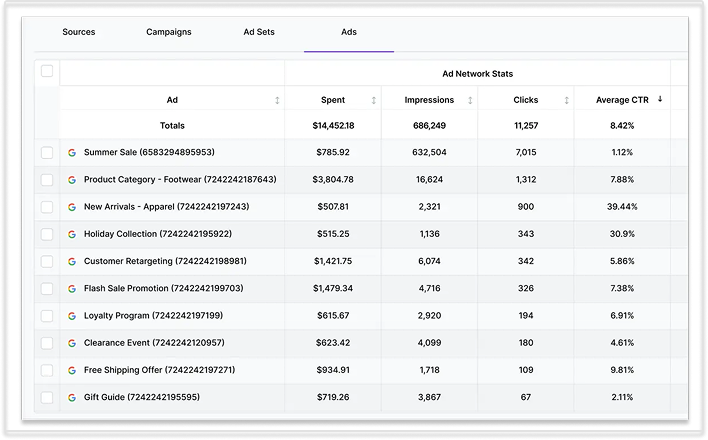
To understand how these different engagement types influence your paid ads attribution, you need clear attribution settings in both your ad accounts and your central analytics tool.
Why the attribution window matters for measurement and budget
Your attribution window is the link between exposure and revenue. It shapes how you read:
- Channel performance
- Campaign quality
- Creative impact
- Return on ad spend (ROAS)
If a user sees your Meta ad on Monday, searches for your brand on Wednesday, and converts from an email Friday, the way you set the attribution window and attribution model changes which channel appears to be responsible.

You can test this yourself with a marketing budget calculator. Change the number of attributed conversions and watch how suggested spend by channel shifts.
Common attribution window challenges
You run into problems when attribution windows do not reflect your actual buying cycle. Some typical issues:
- Windows too short: Early touches in content, social, or display never receive credit. Upper-funnel work looks unprofitable, even when it seeds most of your pipeline.
- Windows too long: Paid channels claim conversions that would have happened anyway. You overpay for traffic and undervalue organic, referral, or email performance.
These errors create attribution bias in marketing. They show up as:
- Over-investing in last-click channels
- Starving channels that introduce people to your brand
- Misreading long user paths that include pauses and research
Attribution windows also interact with your chosen attribution model. Last-click, first-click, and various multi-touch attribution models all behave differently with the same attribution window.
Attribution windows and attribution models
The same 30-day attribution window can tell very different stories depending on how you distribute credit:
- Single-touch models give 100% of the conversion to either the first or last interaction inside the attribution window.
- Rule-based multi-touch models split credit across touches (for example, position-based models or a time-decay attribution model using half-life in exponential decay).
- Data-driven or algorithmic models use patterns in your data to assign fractional credit.
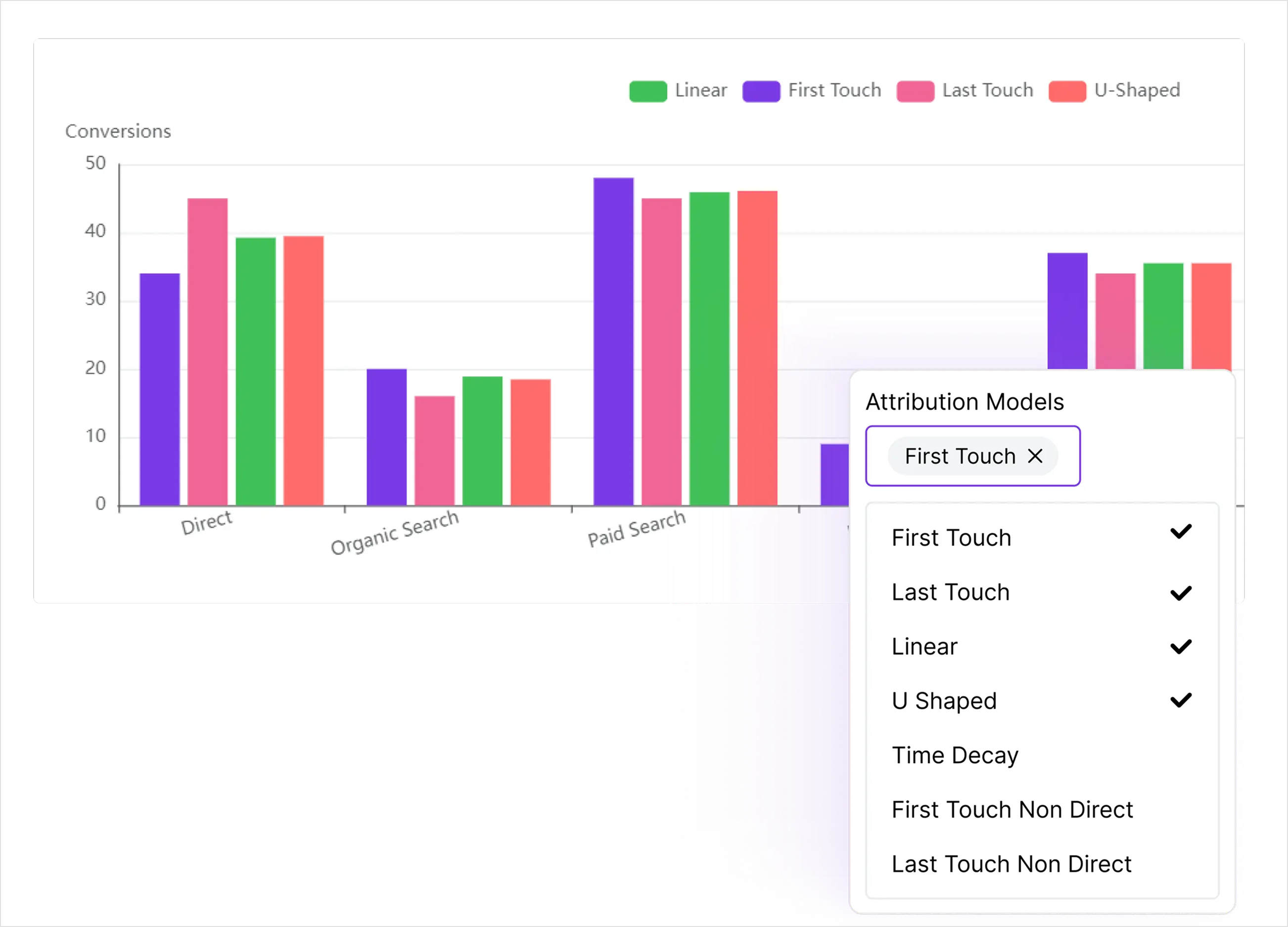
If your window is short, multi-touch models may have only 1 or 2 touches to work with, which changes your marketing attribution window results. If your window is long, these models have more data but also higher risk of counting noise or unrelated visits.
You can explore different attribution models in more depth here: marketing attribution models.
How attribution windows affect your metrics and KPIs
Attribution windows do not just change which channel gets credit. They change the math behind your core KPIs.
Customer acquisition cost and CPI/CPA
Shorter attribution windows usually mean:
- Fewer conversions counted for the same spend
- Higher reported cost per install (CPI)
- Higher cost per acquisition (CPA)
Longer attribution windows:
- Count more conversions for the same spend
- Lower reported CPI/CPA
- Make campaigns look cheaper and more effective
If your attribution window is too long for your business, you could be crediting organic or brand-driven conversions to paid spend. If it is too short, strong upper-funnel campaigns look worse than they are because much of their conversion attribution falls outside the conversion window you selected.
You can check the impact on conversion math with a conversion rate calculator.
ROAS and revenue attribution
Return on ad spend (ROAS) depends heavily on the attribution window. Longer windows:
- Pull in more delayed conversions
- Increase the revenue credited to ads
- Make ROAS look stronger, especially for awareness campaigns
Shorter windows:
- Focus on immediate conversions
- Penalize channels with longer consideration cycles
- Make retargeting, branded search, and email look very strong
You want your attribution window to support realistic revenue attribution, not inflated numbers that look good in a dashboard but do not match billed revenue in your CRM or analytics.
Lifetime value and cohort analysis
Attribution windows also affect:
- Customer lifetime value (LTV) by channel
- Payback periods by cohort
- Budget planning for growth
If your attribution window is too tight, high-value customers who convert slowly may get marked as organic even if paid media started their path. That underestimates the real LTV tied to paid channels and makes you overly cautious with spend.
If the attribution window is too loose, you might assign long-term organic LTV to a single past ad interaction that played a minor role.
How to choose the right attribution window for your business
There is no universal best attribution window. The right choice depends on your product, audience, and go-to-market motion.
Start with your customer path and sales cycle
Begin by mapping your typical path from first touch to conversion. Look at:
- How long it takes new visitors to sign up or purchase
- How many sessions a typical user needs before converting
- Which channels introduce most new users
If you work in B2B SaaS or product-led growth, tools like analytics for SaaS brands and analytics for growth teams can help you read time-to-convert patterns across key segments.
For most businesses:
- Low-cost consumer products and mobile apps: shorter windows
- Mid-ticket subscriptions and software: medium windows
- High-ticket B2B and complex services: longer windows
Match the attribution window to campaign goals
Your attribution window should reflect what you expect from the campaign:
- Short-term promotions and special offers
- Example: 48-hour sale, webinar registration, or limited-time discount
- Use tighter windows, such as 1-day view and 1–7 day click
- Brand-building and brand assets campaigns
- Example: top-of-funnel content, YouTube video series, long-form guides
- Use longer windows, such as 14–30 day click, to recognize delayed impact
- Lifecycle and email marketing funnels
- Example: onboarding sequences, cart abandon flows
- Use medium windows that align with your typical nurture length
You can also vary the attribution window by funnel stage. Top-of-funnel display and video often need longer attribution windows than last-click intent channels like branded search.
Use data to refine your attribution window
Do not guess. Use your analytics data to refine attribution settings over time.
Look at trends and time-lag reports:
- What share of conversions happens in the first 24 hours?
- How many happen between days 2–7?
- How many arrive between days 8–30 or beyond?
If 85% of conversions happens within 7 days of their first touch, a 7-day click window might be reasonable. If a large portion of your revenue arrives in days 8–21, you likely need a longer attribution window.
You can also compare performance using different attribution windows on the same campaign:
- Run reporting with a 7-day click attribution window.
- Run the same report with a 30-day click attribution window.
- Compare which channels gain or lose credit between the 2 settings.
If a channel only looks strong with an extremely long attribution window, it might be receiving more credit than it should.
Practical starting points by business type
Here are common starting points you can adjust based on your own data:
- Impulse ecommerce, casual mobile apps, low-ticket offers
- View-through window: 1 day
- Click attribution window: 1–7 days
- Mid-ticket subscriptions, consumer SaaS, higher-consideration ecommerce
- View-through window: 1–3 days
- Click attribution window: 7–30 days
- B2B SaaS, high-ticket products, long sales cycles
- View-through window: 3–7 days
- Click attribution window: 30–90 days, though Usermaven lets you extend this up to a full 365-day window for complex, long-cycle deals
If you ask whether a 7-day attribution window is enough, the answer is:
- Often yes for B2C ecommerce and simple apps.
- Often no for B2B SaaS and large, multi-stakeholder deals, where a longer lookback window like Usermaven’s 365-day option gives a clearer picture.
Use your own time-lag data, combined with pricing work such as a SaaS pricing calculator, to confirm.
Attribution windows across platforms and tools
Every ad platform and analytics tool handles attribution windows differently. That is why cross-channel attribution gets tricky.
You might pull one number from an ad platform and a different number from your analytics tool for the same campaign. Often, the attribution window or attribution model is the main reason.
Usermaven integrations and other central analytics setups help align these differences, but you still need to understand how each system treats your attribution period.
Mobile measurement partners (Adjust, AppsFlyer)
Mobile measurement partners such as Adjust and AppsFlyer specialize in app install and in-app event attribution.
Typical defaults:
- Click attribution window: around 7 days
- View-through window: around 24 hours
- Extra controls for reattribution and inactivity windows
They connect pre-install ads to post-install behavior, and they help you see which user acquisition funnel phases deliver not just installs but revenue events.
Social platforms and Google Ads
Social and search platforms tie attribution windows directly to bidding and delivery:
- Meta (Facebook and Instagram)
- Common default: 7-day click, 1-day view
- You can choose shorter options such as 1-day click for very direct-response offers
- Google Ads
- Search and Shopping often default to a 30-day click attribution window
- Many conversion actions can go up to 90 days
- YouTube supports engaged-view attribution with shorter windows for video viewers
When Meta uses a 7-day click attribution window and your analytics uses 30 days, the same campaign may show very different results.
Email platforms and other tools
Email platforms, such as those you would use for an email marketing funnel, have their own attribution windows. Common patterns:
- 5–7 days for email click attribution
- 1–3 days for email view or open attribution (where opens are still measured)
Web analytics, CRM tools, and website analytics platforms add another layer, each with their own defaults for attribution tracking.
Platform comparison: common default attribution windows
You can use this comparison as a quick reference when reviewing attribution settings:
| Platform | Click | View | Maximum lookback |
|---|---|---|---|
| Meta | 7 days | 1 day | Limited |
| Google Ads | 30 days | — | 90 days |
| Adjust | 7 days | 24 hrs | Configurable |
| AppsFlyer | 7 days | 24 hrs | Configurable |
| Usermaven | Configurable | Configurable | 365 days + Custom |
Maximize your ROI
with accurate attribution
Advanced attribution window strategies in a privacy-first world
Privacy changes over the last few years have reshaped attribution window choices:
- Apple’s App Tracking Transparency (ATT)
- SKAdNetwork for app install campaigns
- Third-party cookie deprecation
- Stricter browser-level tracking rules
These changes influence how long you can track users and how accurate your attribution window can be.
Key implications:
- Some mobile campaigns now rely on shortened, fixed windows defined by SKAdNetwork.
- Browsers such as Safari and Firefox shorten cookie lifetimes, which restricts longer attribution windows for cookie-based tracking.
- Modeled conversions and probabilistic attribution approaches fill gaps where deterministic identifiers are limited.
You need to set these attribution windows so they align with your real churn and reactivation patterns, not just default settings.
Using first-party data and multi-touch attribution to make attribution windows work
Ad platforms have a clear incentive to show strong performance. To judge channels fairly, you need an independent, first-party data analytics layer that covers:
- All traffic sources (paid, organic, referral, email, direct)
- All sessions and devices for each user
- All key events in your funnel
With this foundation, you can design attribution windows that fit your business rather than copying ad platform defaults and can run consistent attribution tracking across channels.
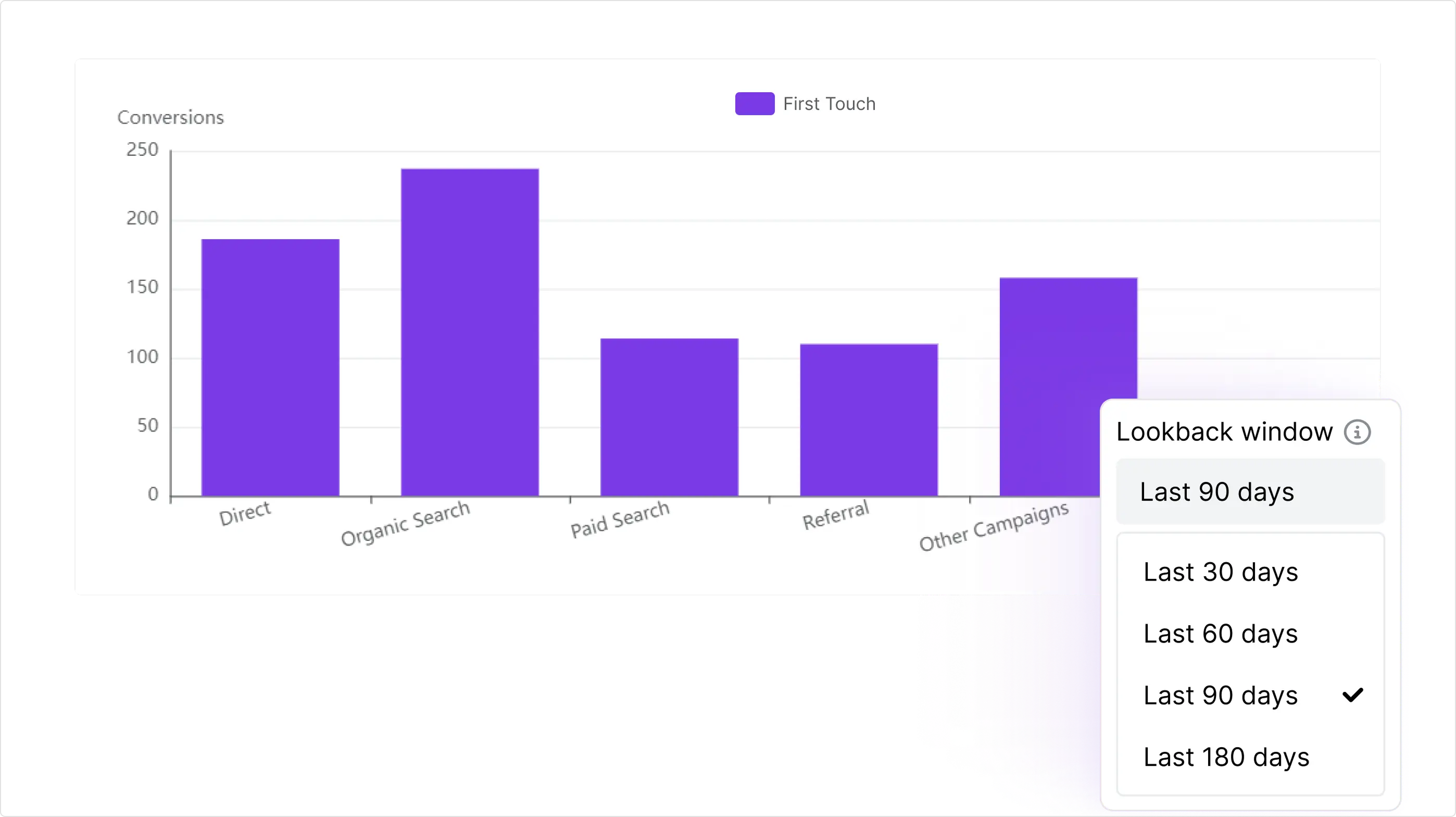
Usermaven is an example of an analytics platform that focuses on first-party tracking, multi-touch attribution, and flexible lookback windows. With Maven AI and user journeys, you can:
- See the full path from first visit to revenue with detailed customer path analysis
- Compare different attribution models, attribution periods, and attribution reports
- Set different attribution windows for different funnel stages and paid ads attribution
- Connect data from key channels through integrations with Google Ads, Meta, HubSpot, and others, and feed that into AI-powered attribution insights
If you combine this with solid UTM tagging, product event tracking, and consistent website analytics, your attribution window becomes a strategic setting rather than a guess.
Conclusion
Choosing the right attribution window is essential for understanding what truly drives conversions. When combined with the right attribution model and accurate first-party data, it gives you a complete view of how customers discover, evaluate, and convert across every marketing channel. Regularly reviewing your attribution settings ensures your reports reflect real customer behavior and helps you make smarter budgeting and optimization decisions.
Usermaven is the best marketing attribution platform for businesses that want complete visibility into the customer journey. With multi-touch attribution, flexible attribution windows, first-party data tracking, AI-powered insights, and unified marketing and revenue reporting, Usermaven helps you understand what actually drives pipeline and revenue, not just clicks and conversions.
Ready to measure marketing performance with confidence?
Ready to see Usermaven in action? Explore the platform or book a demo for a closer look.
FAQs
What is an attribution window in simple terms?
An attribution window is the amount of time after someone interacts with your marketing that a later conversion can still be credited to that interaction. For example, if your click attribution window is 7 days and a user converts on day 3, the click gets credit. If they convert on day 10, it usually will not.
This setting controls how your analytics and ad platforms connect touchpoints to revenue through their conversion attribution logic.
What is the difference between an attribution window and a lookback window?
Both deal with time, but they focus on different sides of the same process:
– Attribution window: how long a specific touchpoint can receive credit after it occurs.
– Lookback window: how far back the system searches for relevant interactions when a conversion happens.
In many platforms, these are the same number. More advanced tools let you set a broader lookback window than the attribution window so you can see history without necessarily granting full credit to older touches. That flexibility helps you compare di
What is the best attribution window?
There is no single best attribution window for every business. As a starting point:
– 1–7 day click windows work well for low-ticket ecommerce and simple apps.
– 7–30 day click windows fit many mid-ticket subscriptions and B2C SaaS.
– 30–90 day click windows are better for high-ticket B2B deals and long sales cycles.
The “best” marketing attribution window for you is the one that matches your real time-to-convert. Use time-lag reports, CRM data, and user paths to see when most conversions happen, then align your attribution period with those patterns.
Is a 7-day attribution window enough?
A 7-day attribution window is a common default, but it is not always enough:
– Often enough: impulse purchases, direct-response offers, and many B2C ecommerce products.– Often not enough: B2B SaaS, high-ticket purchases, and complex services where people research, get approvals, and compare vendors.
Updated

Written by
Imrana Essa
SaaS Marketing Lead
Imrana Essa is a marketing lead and content strategist with 8+ years of experience creating and leading content for B2B and SaaS brands. She specializes in marketing analytics, attribution, content strategy, and organic growth, translating complex marketing concepts into clear, actionable insights. Her work focuses on helping marketers understand performance, make data-informed decisions, and build strategies that contribute to sustainable growth.
All articles by Imrana →